

Host your mock tests on a real exam screen. Free.
Give your students the exact computer-based test experience of JEE, NEET, CUET, CAT, banking and SSC. Keep tests private to your batch or publish them publicly, and get every result with deep analytics.
- Private links or invite-only tests
- AI import from Word, PDF & Excel
- Results emailed with PDF scorecards
- Session replay for every attempt
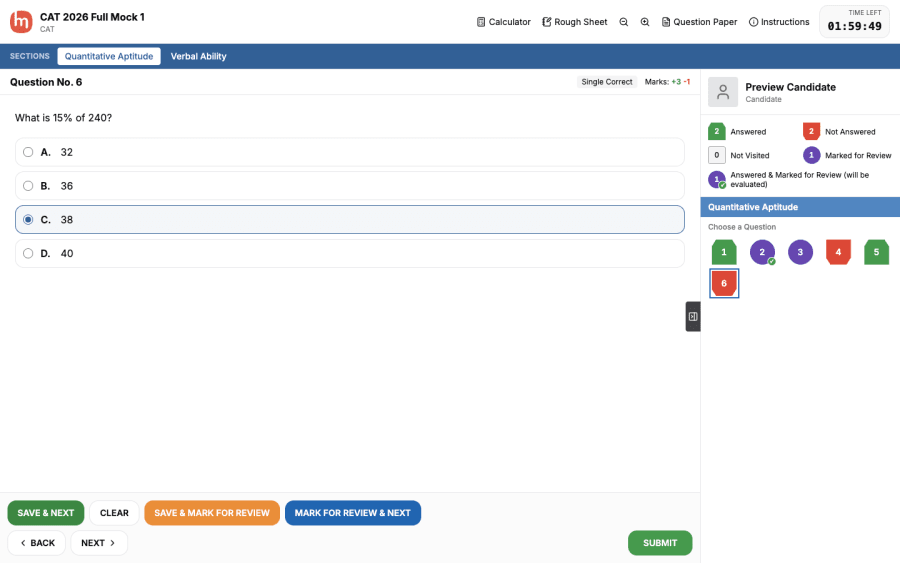
Four exam screens, one click apart
Pick the screen your students will face on exam day. Switch any time; the questions stay the same.
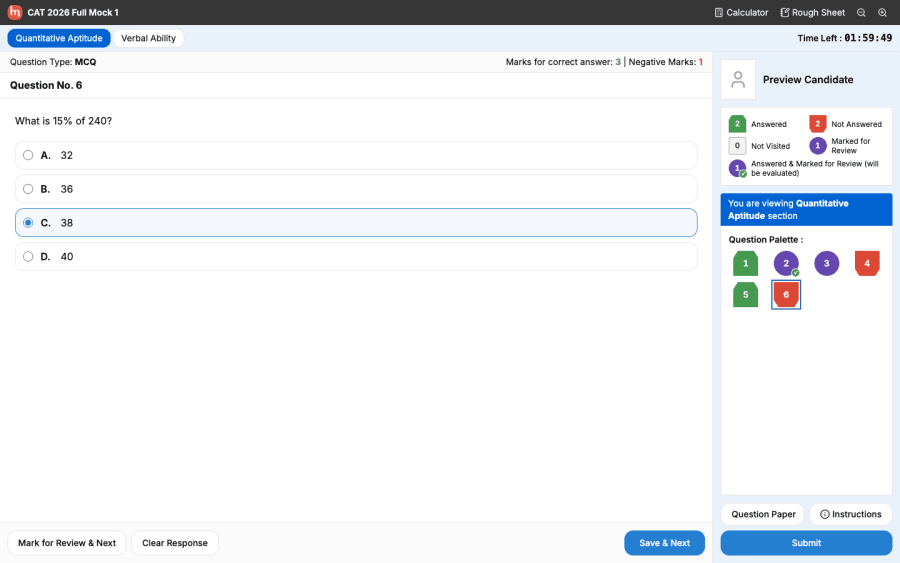
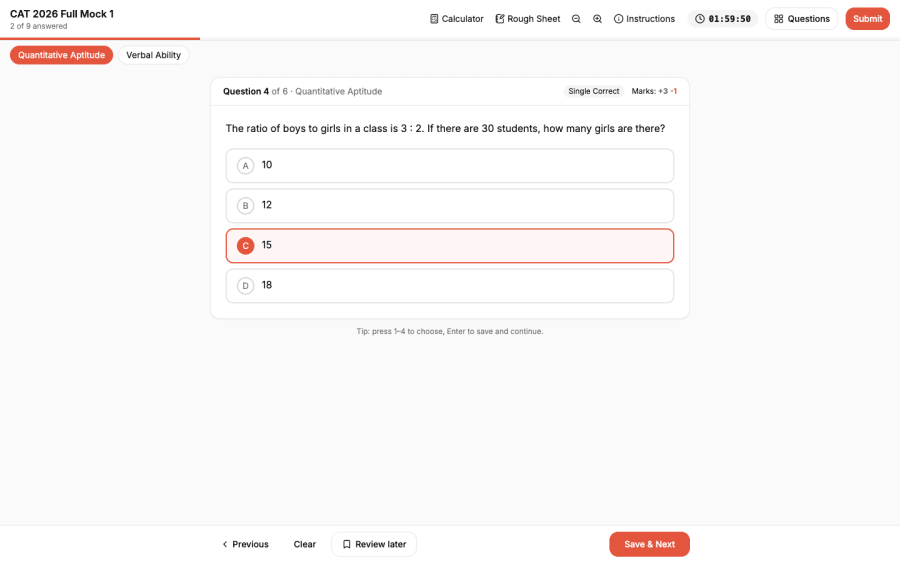
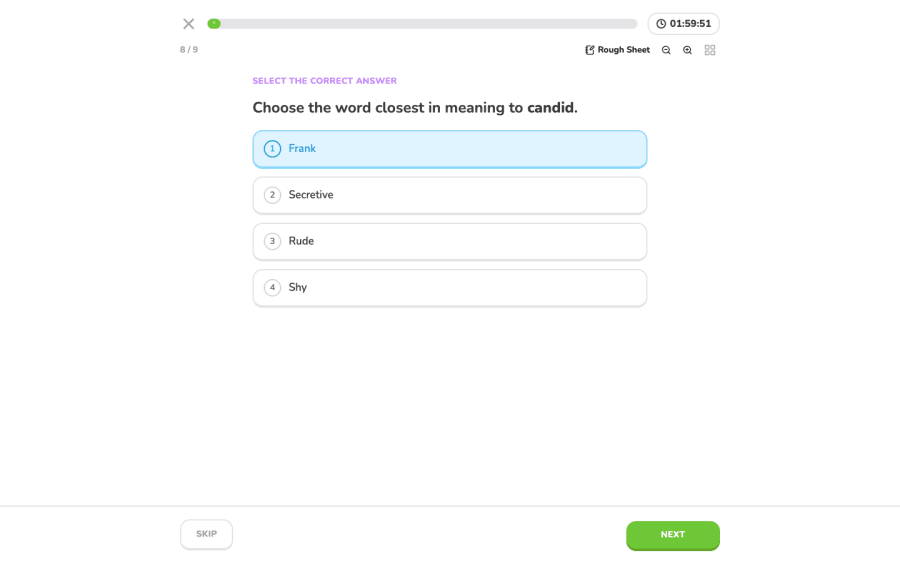
Everything a test series needs
Built for coaching institutes, tutors and schools running regular mocks.
Real exam-style screens
Four layouts your students already know: JEE / NEET / CUET, CAT / Banking / SSC, a clean modern view, and a one-question-at-a-time language test.
Private or public, your call
Share a link with your batch, restrict a test to the email addresses you add, or publish it for every student on MyExamTrack.
Invites and results by email
Students get an invite the moment you add them, and a branded result email with a PDF scorecard when they finish.
Import from Word, PDF or Excel
Upload your existing question papers. AI reads them, picks up the answer key, and can work out missing answers for you to check.
AI that writes and checks questions
Generate practice questions on any topic, then the AI solves each one again independently to catch wrong keys before your students do.
Exam-accurate timing
Overall timers, section-wise timers with locked sections (CAT-style), and per-question timers that move on automatically.
On-screen tools
Basic or scientific calculator, a rough sheet, text zoom, a numeric keypad for numerical answers and full maths (LaTeX) support.
Session replay & proctoring
Every attempt is recorded: time per question, answer changes, tab switches and full-screen exits, with a replay you can scrub through.
Instant, deep analysis
Score, accuracy and section-wise results the second a student submits, plus question-by-question review with explanations.
Build as a team
Invite fellow teachers as editors. Only you (and our admins) can delete a test.
Every question type
Single correct, multiple correct and numerical (TITA) questions, passages side by side, images, per-question marks and negative marking.
Shuffle & randomise
Shuffle questions and options per student while keeping passage sets together, so neighbours can't copy.
Live in three steps
- 1
Create your free account
Sign in and open Create Tests from your dashboard. No setup fee, no card.
- 2
Add or import questions
Type them in the exam-style editor, paste a whole paper, upload Word / PDF / Excel, or let AI generate them.
- 3
Share with your students
Publish privately and send the link, or add student emails so only they can take it. Results arrive automatically.
Anyone with the link
Perfect for a batch WhatsApp group. Not listed anywhere; students sign in and start.
Only invited students
Add emails in bulk. Each student gets an invite; nobody else can open the test.
Public on MyExamTrack
Reach students searching for your exam. Public tests are reviewed by our team before they go live.
Questions coaching institutes ask
Is the mock test platform really free for coaching institutes?+
Yes. Creating tests, sharing them privately with your students, results emails, PDF scorecards and attempt analytics are free. AI features have a fair daily usage limit.
Can I keep my tests private to my own students?+
Yes. Choose 'Anyone with the link' to share with your batch, or 'Only invited students' and add their email addresses. Invited students get an email and can take the test even if they sign up later. Private tests are never listed publicly.
Which exam patterns are supported?+
Any objective exam. The layouts mirror JEE, NEET and CUET screens, CAT, banking and SSC screens, and language tests, with section-wise and per-question timers, negative marking, numerical answers and calculators.
Can I upload my existing question papers?+
Yes. Upload Word (.docx), PDF, Excel (.xlsx/.xls), CSV or text files. The AI extracts the questions and answer key, and you review everything before it's added. Scanned PDFs need OCR first.
Do students get their results?+
Instantly on screen, with a question-wise review, and by email with a PDF scorecard attached. You can choose to hide the answer key if you want to reuse a test.
Can I see how each student attempted the test?+
Yes. You get time spent per question, answer changes, focus losses and full-screen exits, plus a replay of the attempt.
Run your next mock test on MyExamTrack
Free for coaching institutes. Set up your first test in minutes, or import the paper you already have.